
Low-code workflow studio for automating loan approvals processes
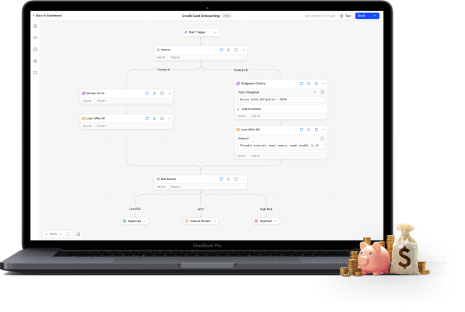
Lenders faced inefficiencies in creating workflows due to reliance on developers and complex tools. Sentinel addresses these issues with a no-code platform for scalability, user-friendly workflows, balancing customisability with simplicity.
Client/Company

FinBox (Sentinel Team) - B2B Fintech Startup
https://finbox.in/sentinel/
My Role
Lead Designer (Product & Marketing)
Project Lead (Product Management)
Collaborators
Product Managers
Developers
Marketing Team (For GTM Strategy & Decks)
Duration
April ‘23 - Aug ‘24

Developer dependency blocking non-technical workflow creation
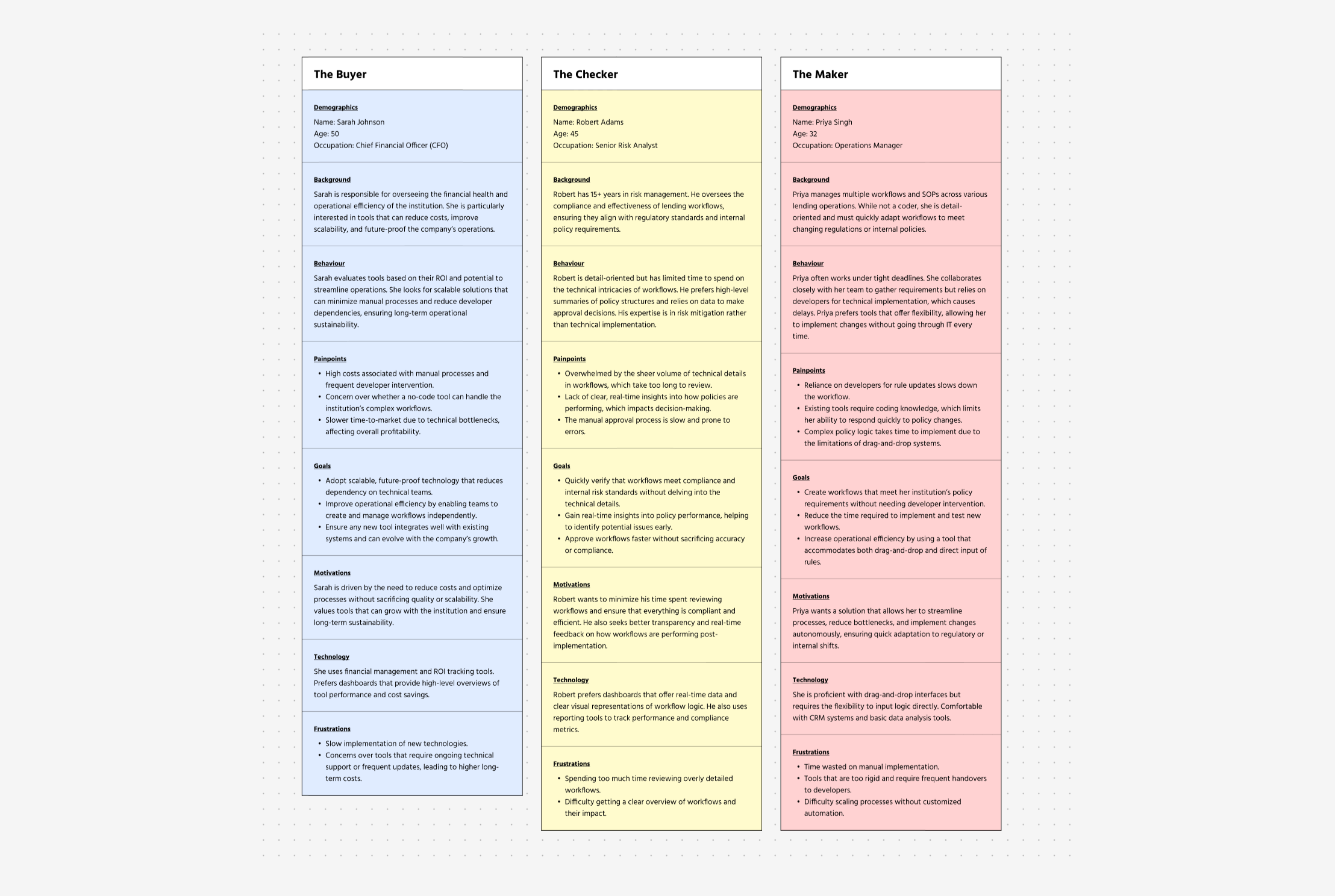
Target audience & Personas
Maker
Creates workflows by adding rules, formulas and logic.
Pain Points: Relied heavily on developers for implementation, leading to delays.
Checker
Reviews and validates workflows for accuracy and compliance.
Pain Points: Lack of real-time feedback tools, causing inefficiencies.
Buyer
Decision-maker responsible for adopting the solution.
Pain Points: Needed scalable and cost-effective tools to reduce operational efforts.
Research Methods
In-Dept User Interviews
Conducted semi-structured interviews with Makers and Checkers to explore challenges in their tools, workflows, and collaboration with developers.
Open-Ended Surveys
Distributed surveys to gather anonymous feedback on time-consuming tasks, challenges with current tools, and ideas for an improved solution.
Competition Analysis
Existing tools revealed key gaps that shaped Sentinel's design:
Alloy lacked flexibility for non-standard workflows, inspiring Sentinel’s dynamic policy monitoring.
Retool was too complex for non-technical users, prompting a balance between customization and simplicity.
Bubble.io struggled with scalability, driving Sentinel’s focus on performance for large datasets.
FigJam oversimplified workflows, influencing Sentinel’s intuitive yet robust design.
Synthesis methods
User Journey & Pain Point Mapping
Synthesised interview and observation data into a journey map, highlighting key pain points. Mapping these challenges across user roles provided a clear, holistic understanding of user needs.
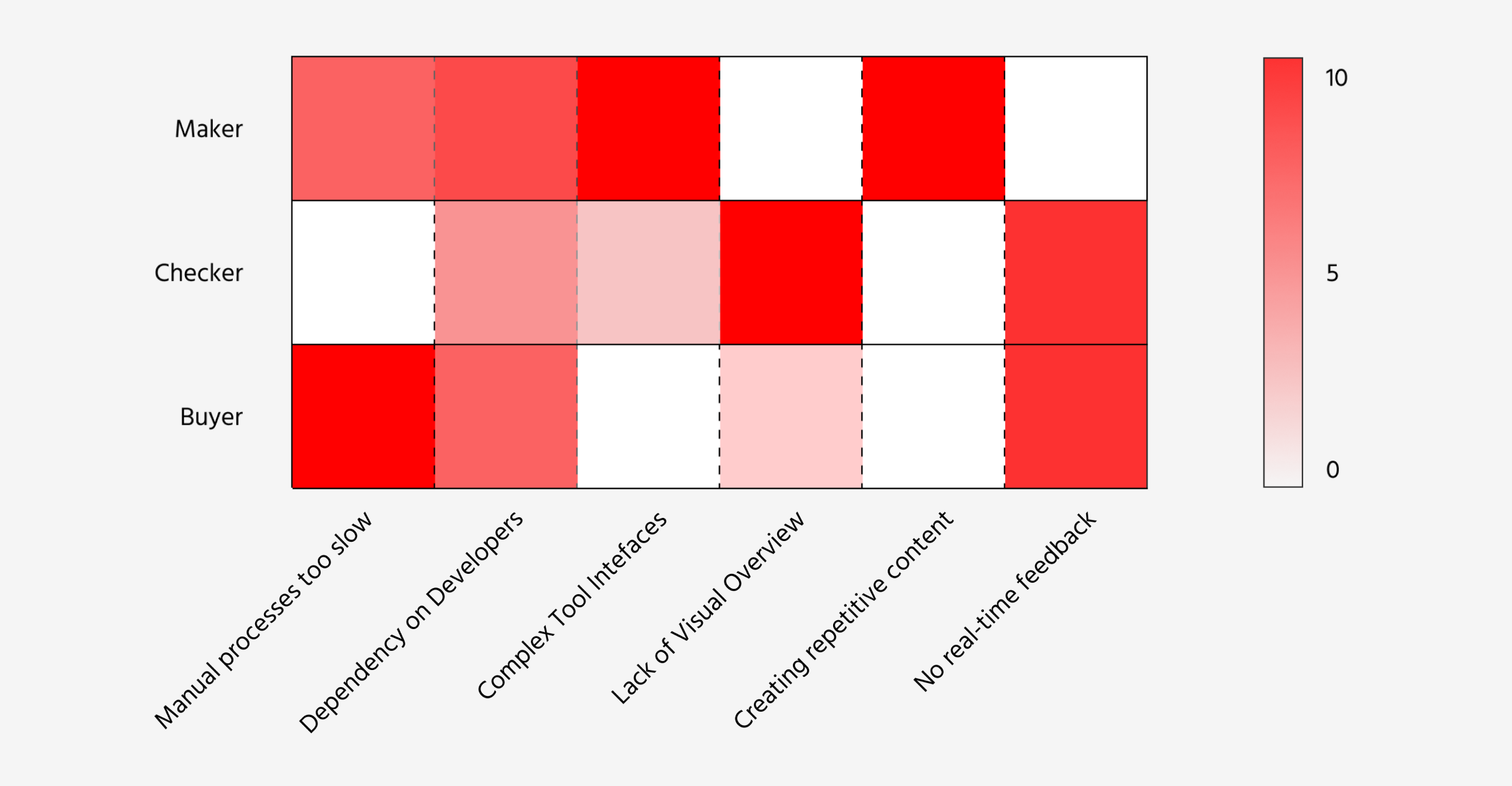
Key issues
Reliance on Developers
Overly Complex Tools
Poor Workflow Visualization
Redundant Repetitive Work
No Real-Time Feedback
Disconnected Testing Process
From drag-drop confusion to intuitive policy building
User Testing Process
To evaluate usability and effectiveness, we conducted iterative testing through Figma prototypes and sandbox environments:
In-house Testing: Policy creation experts tested prototypes, providing real-time feedback during closely monitored sessions.
Client Sandbox Testing: Select clients used a sandbox version for five days, with analytics and virtual feedback sessions capturing insights.
V1 Design and Testing Insights
The first iteration aimed to provide a visual, drag-and-drop interface for workflow creation. However, user testing revealed critical issues:
Challenges in Navigation and Hierarchy
- Unclear UI layout made navigation difficult.
- Editing blocks required too many steps.
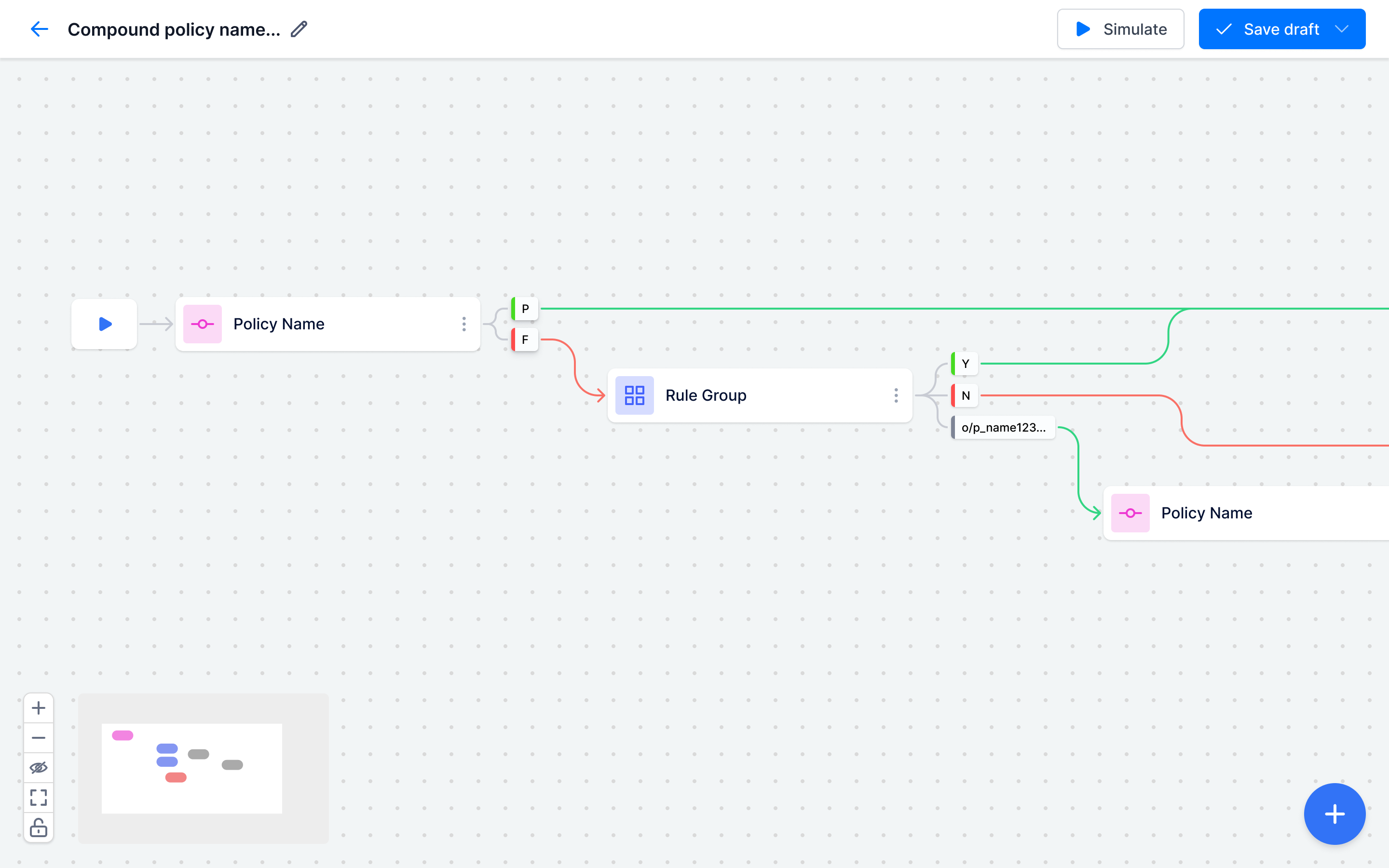
Barriers to Efficiency in Workflow Editing
- Creating rules involved unnecessary steps in drag-drop UI.
- Interacting with blocks felt clunky.
- A cluttered UI slowed workflows.
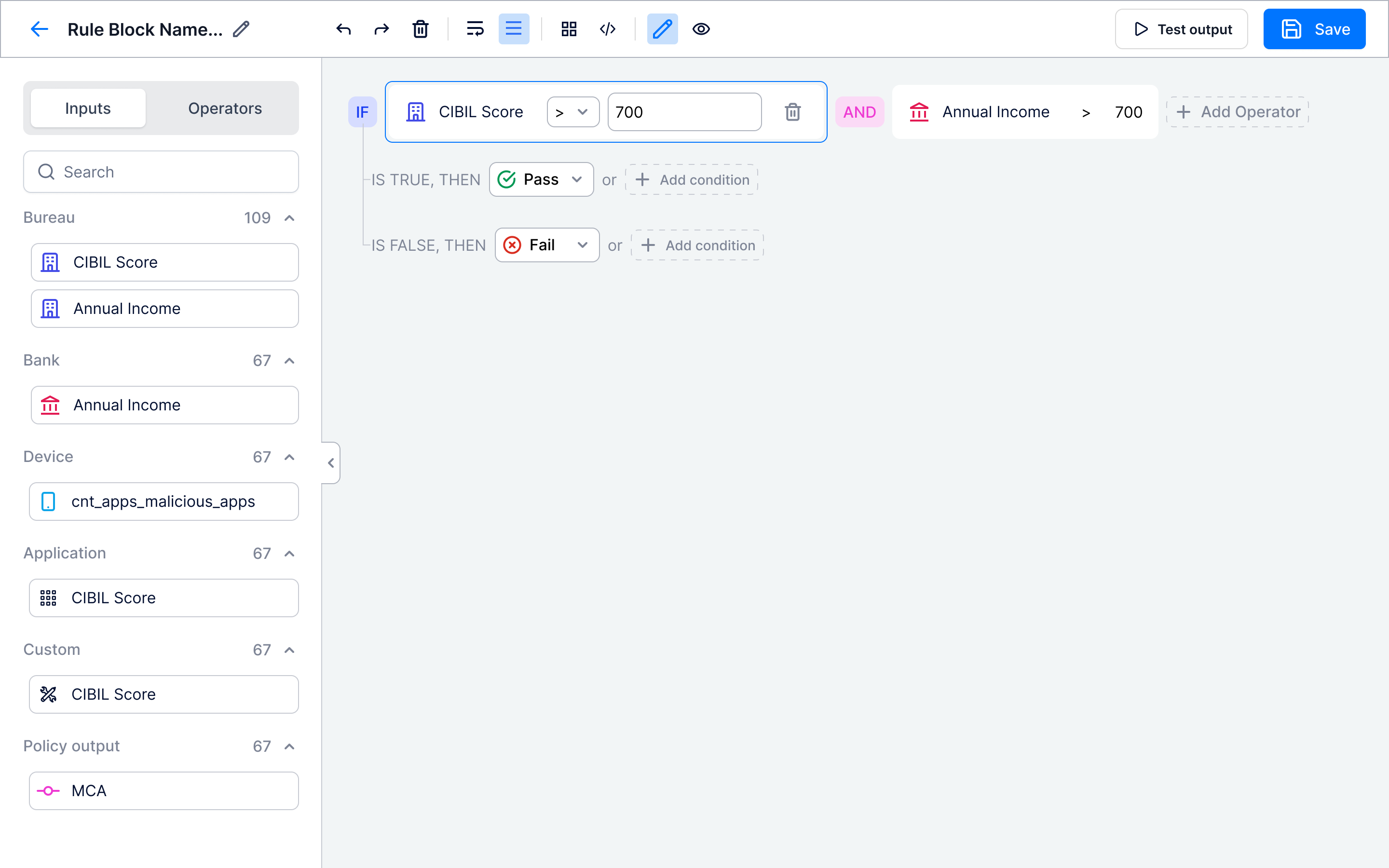
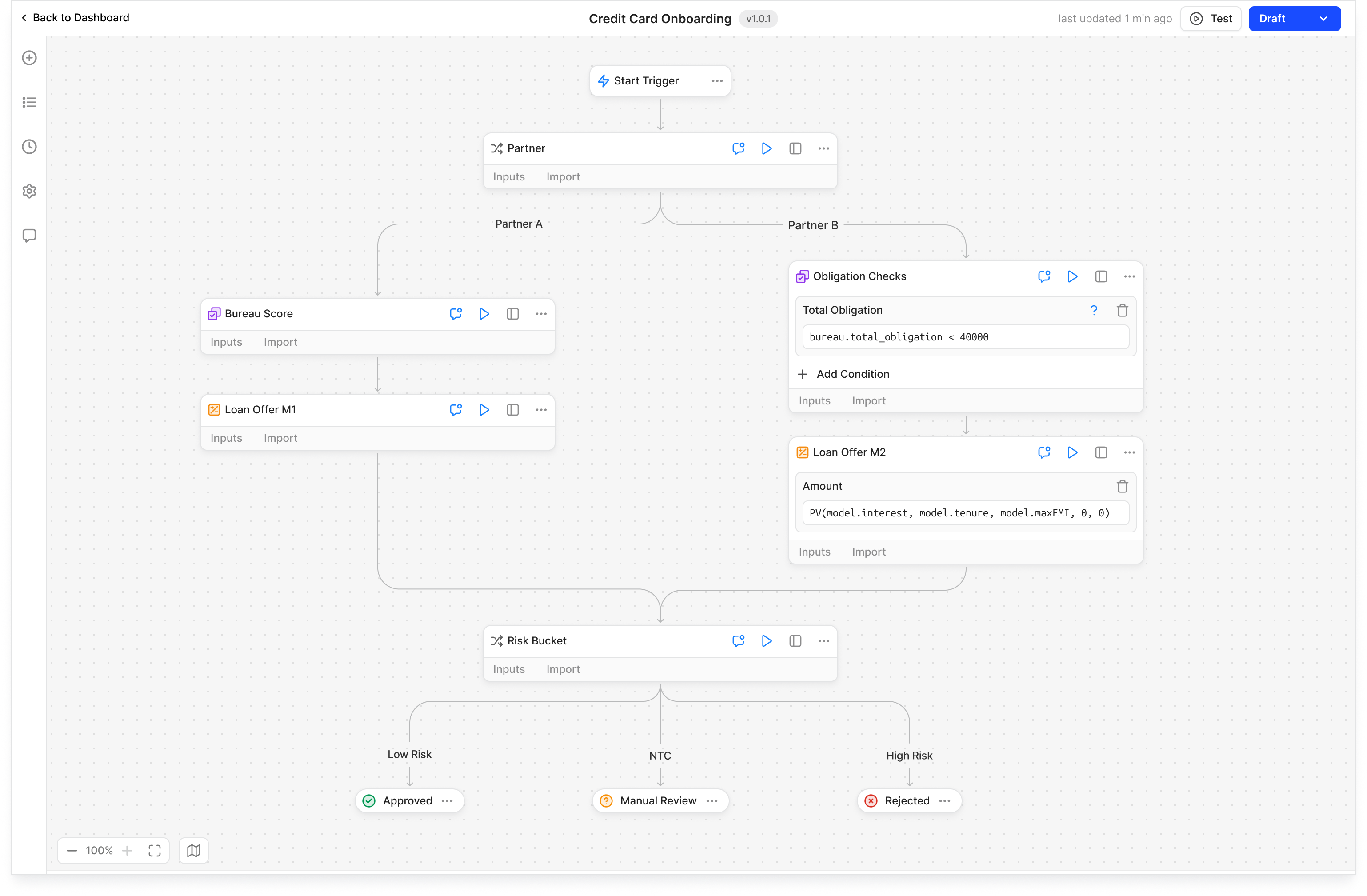
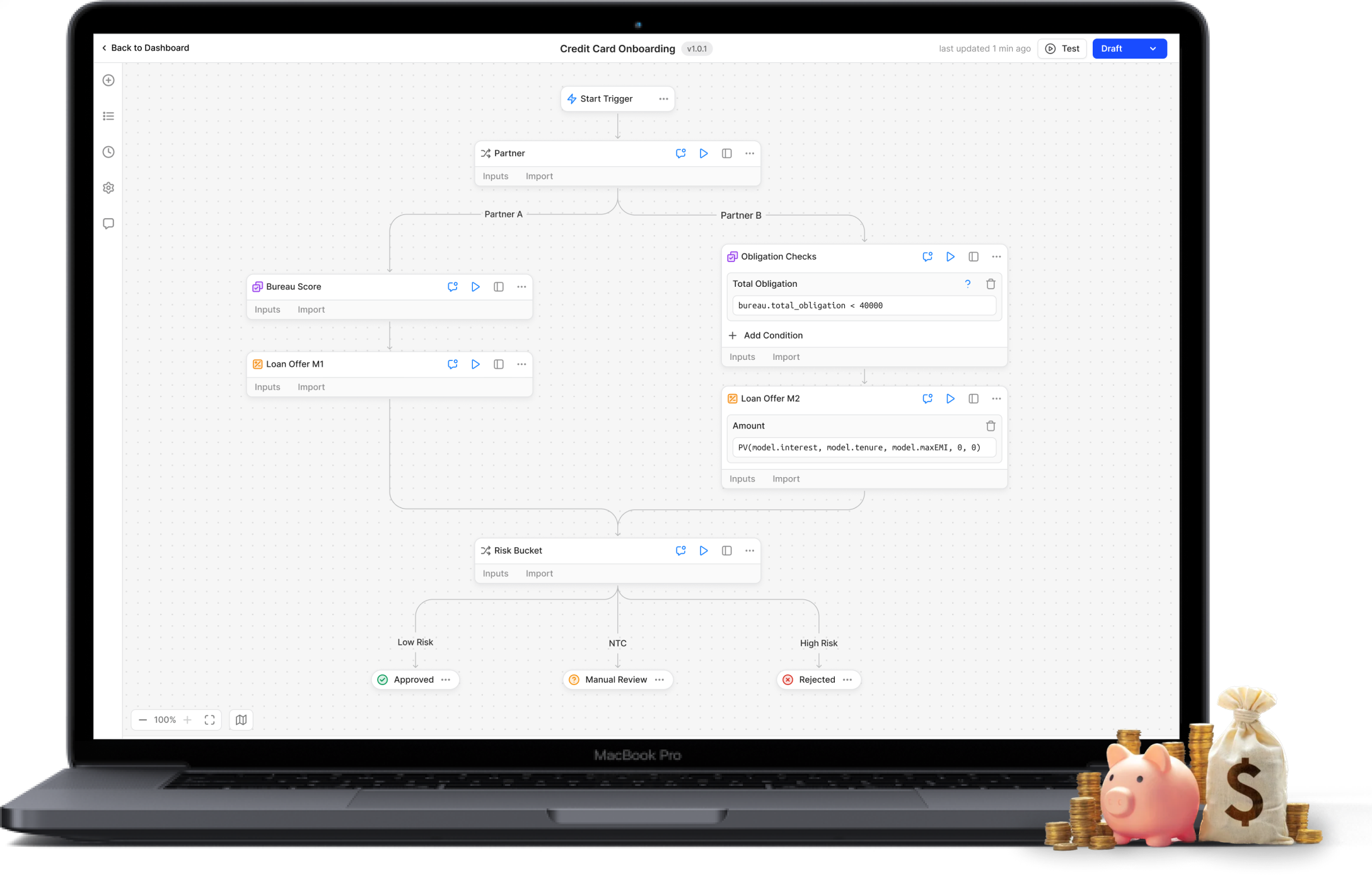
Modern minimalistic UI for technical and non-technical users
Modern Minimalistic UI for Enhanced Usability
The final UI features a clean, modern design with adaptive text resizing for readability. Users can zoom out for an overview and zoom in for direct edits within blocks, reducing effort with embedded text boxes.
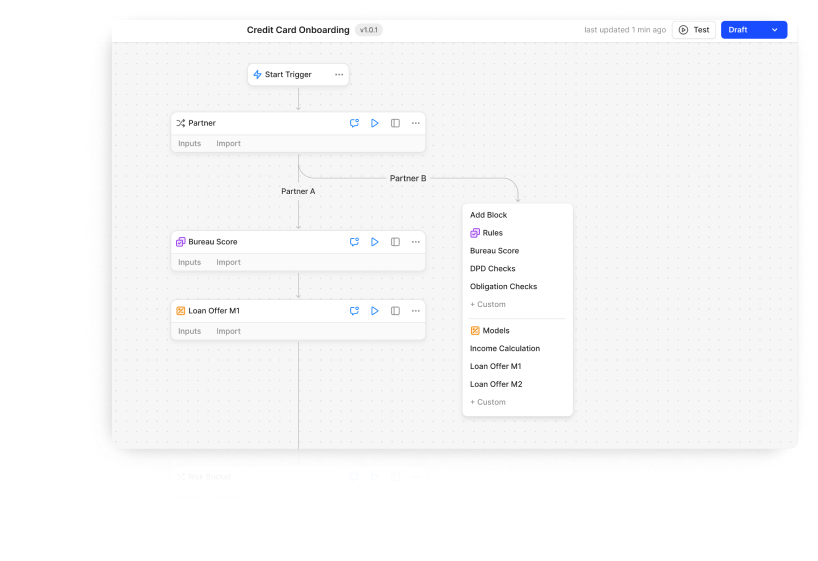
Comprehensive Rules Library
A library of predefined rules and expressions allows quick implementation while offering customization flexibility.
Pivot from No-Code to Low Code
Replaced friction-heavy drag-and-drop with low-code text input—users now write formulas and conditional logic directly.
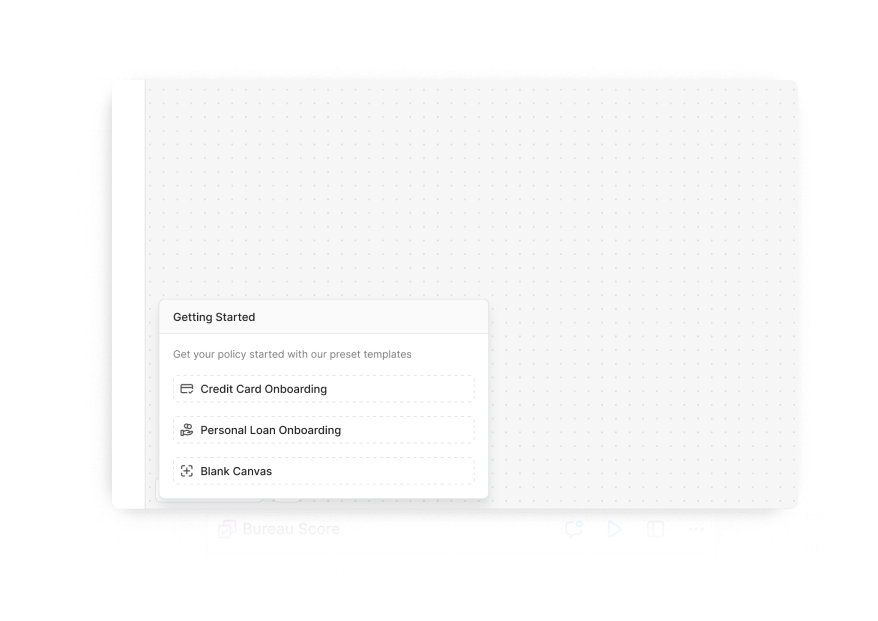
Template-Based Customization
Pre-built templates aligned with industry standards let users launch and modify workflows instantly, reducing setup time.
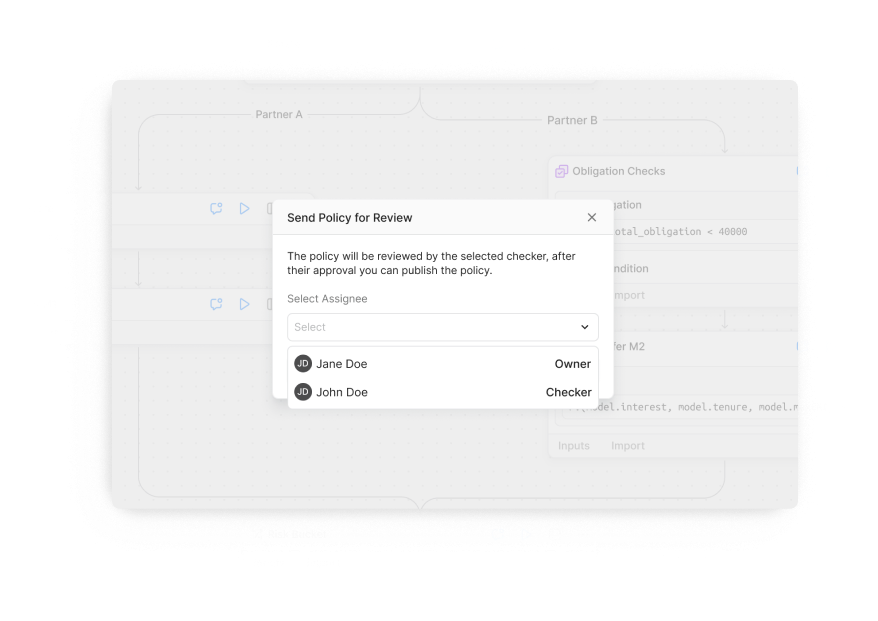
Role-Based Access Control
Makers can send policies directly to checkers for approval, ensuring a seamless review process.
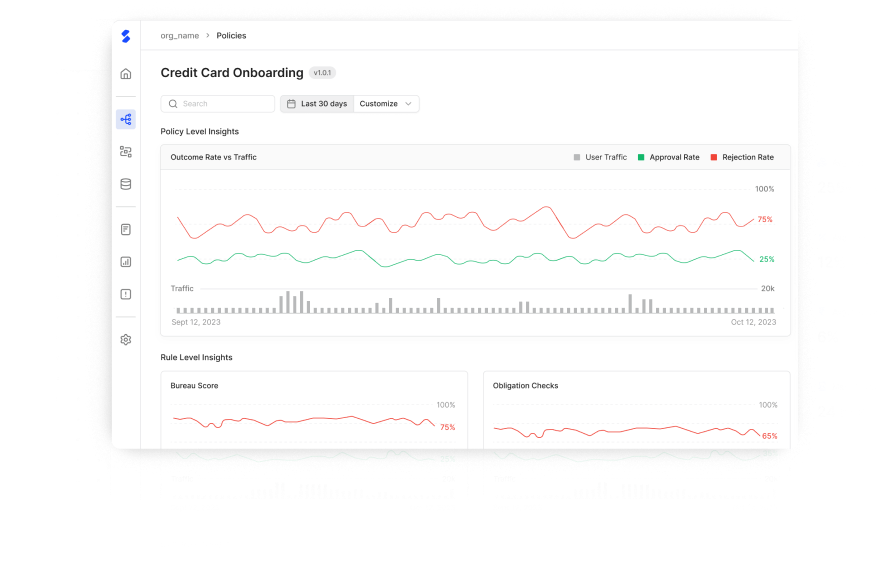
Real-Time Insights & Tracking
Users can monitor policy performance live, enabling data-driven optimizations without delays.
Customization and simplicity must coexist equally
Learnings
I learned to balance customizability with simplicity, designing for both technical and non-technical users. Integrating real-time data and ensuring scalability challenged me to create solutions that are both powerful and user-friendly.
Future Scope
Future improvements could include AI-based rule generation, allowing users to describe logic in plain English, with the AI converting it into workflow blocks. Additionally, we could introduce custom templates for policies, rules, and expressions, enabling organizations to standardize workflows across teams.




Get In Touch!
apharkare@gmail.com
Let’s Talk
Download Resume
Home
Work
About
© Aarya Harkare 2025. All Rights Reserved.

Let’s Talk
FinBox

Fastlane
Atelier
Other Projects
Low-code workflow studio for automating loan approvals processes
Introduction
Research and Insights
The challenge and pivot
Final design
Learnings and next steps
Lenders faced inefficiencies in creating workflows due to reliance on developers and complex tools. Sentinel addresses these issues with a no-code platform for scalability, user-friendly workflows, balancing customisability with simplicity.
Client/Company
FinBox (Sentinel Team) - B2B Fintech Startup
https://finbox.in/sentinel/
My Role
Lead Designer (Product & Marketing)
Project Lead (Product Management)
Collaborators
Product Managers
Developers
Marketing Team (For GTM Strategy & Decks)
Duration
April ‘23 - Aug ‘24
Developer dependency blocking non-technical workflow creation
Target audience & Personas
Maker
Creates workflows by adding rules, formulas and logic.
Pain Points: Relied heavily on developers for implementation, leading to delays.
Checker
Reviews and validates workflows for accuracy and compliance.
Pain Points: Lack of real-time feedback tools, causing inefficiencies.
Buyer
Decision-maker responsible for adopting the solution.
Pain Points: Needed scalable and cost-effective tools to reduce operational efforts.
Research Methods
In-Dept User Interviews
Conducted semi-structured interviews with Makers and Checkers to explore challenges in their tools, workflows, and collaboration with developers.
Open-Ended Surveys
Distributed surveys to gather anonymous feedback on time-consuming tasks, challenges with current tools, and ideas for an improved solution.
Competition Analysis
Existing tools revealed key gaps that shaped Sentinel's design:
Alloy lacked flexibility for non-standard workflows, inspiring Sentinel’s dynamic policy monitoring.
Retool was too complex for non-technical users, prompting a balance between customization and simplicity.
Bubble.io struggled with scalability, driving Sentinel’s focus on performance for large datasets.
FigJam oversimplified workflows, influencing Sentinel’s intuitive yet robust design.
Synthesis methods
User Journey & Pain Point Mapping
Synthesised interview and observation data into a journey map, highlighting key pain points. Mapping these challenges across user roles provided a clear, holistic understanding of user needs.
Key issues
Reliance on Developers
Overly Complex Tools
Poor Workflow Visualization
Redundant Repetitive Work
No Real-Time Feedback
Disconnected Testing Process
From drag-drop confusion to intuitive policy building
User Testing Process
We evaluated our no-code platform in-house and externally.
In-house Testing: Policy creation experts tested prototypes, providing real-time feedback during closely monitored sessions.
Client Testing: Select clients used a sandbox version for five days, with analytics and virtual feedback sessions capturing insights.
V1 Design and Testing Insights
The no-code drag-and-drop workflow was counterintuitive for writing rules. Bankers were actually strong at logical thinking and simple code, so dragging blocks for every rule only slowed workflow creation.
Barriers to Efficiency in Workflow Editing
- Creating rules involved unnecessary steps in drag-drop UI.
- Interacting with blocks felt clunky.
- A cluttered UI slowed workflows.
Challenges in Navigation and Hierarchy
- Unclear UI layout made navigation difficult.
- Editing blocks required too many steps.
Modern minimalistic UI for technical and non-technical users
Modern Minimalistic UI for Enhanced Usability
The final UI features a clean, modern design with adaptive text resizing for readability. Users can zoom out for an overview and zoom in for direct edits within blocks, reducing effort with embedded text boxes.
Pivot from No-Code to Low Code
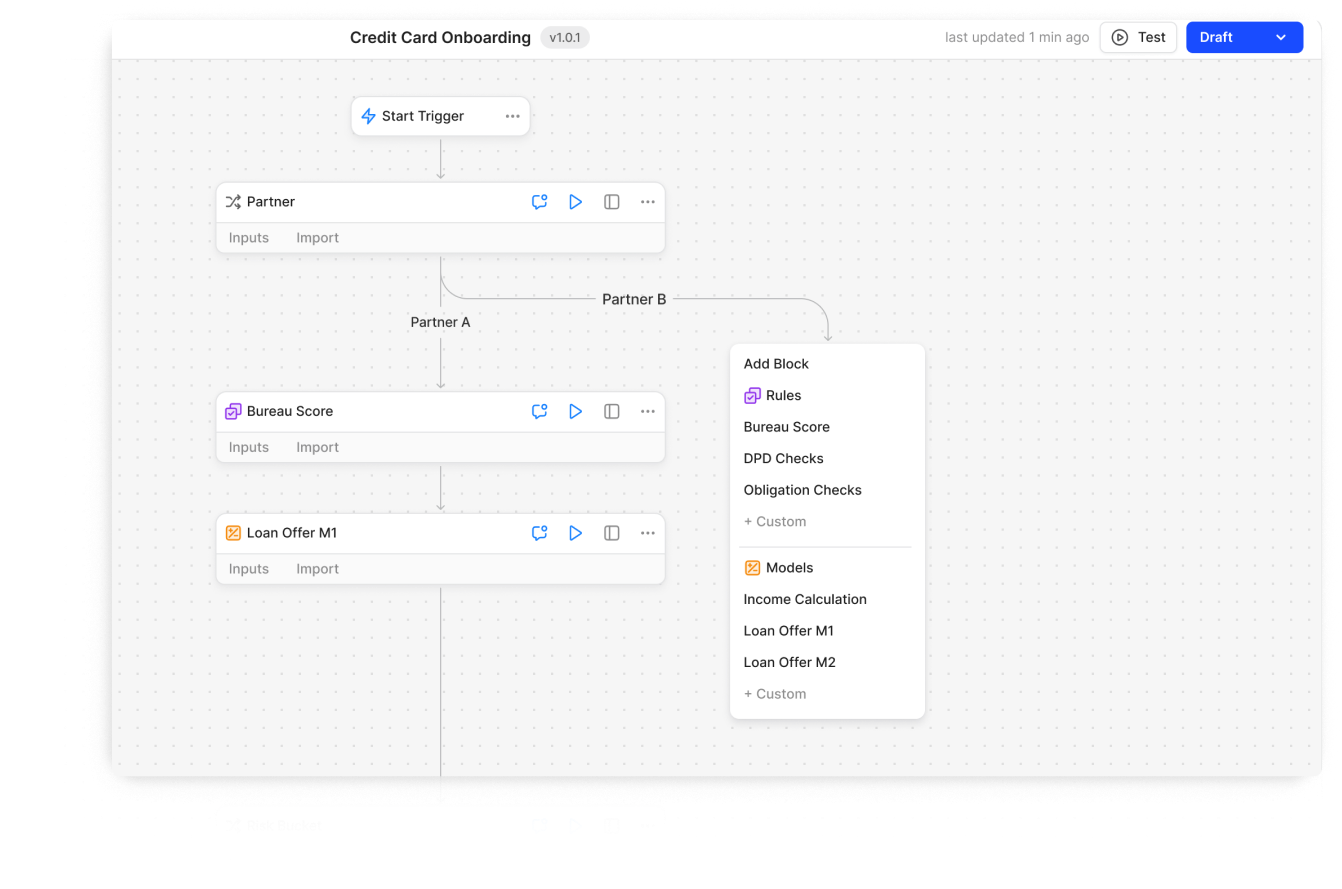
Replaced friction-heavy drag-and-drop with low-code text input—users now write formulas and conditional logic directly.
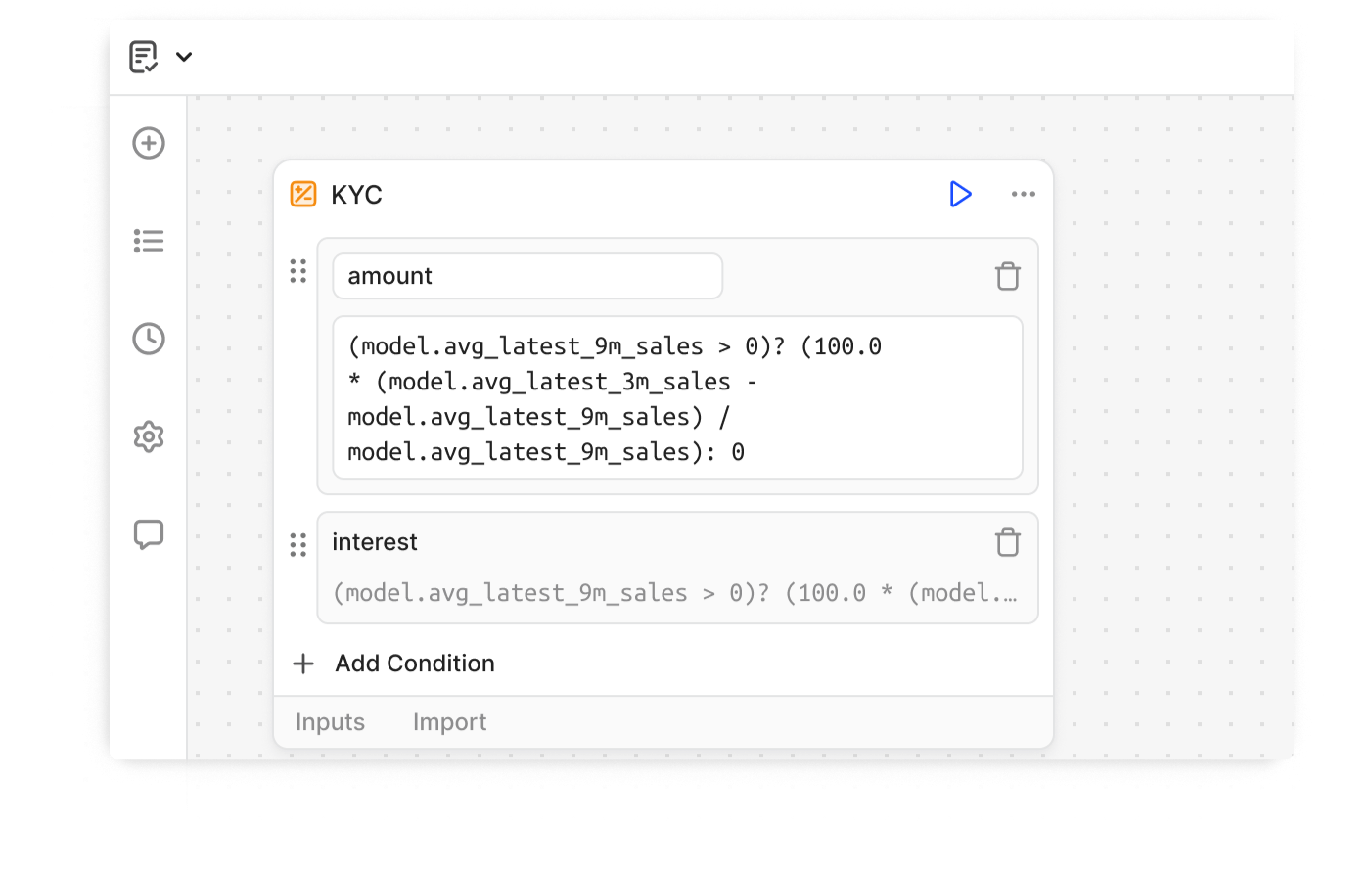
Comprehensive Rules Library
A library of predefined rules and expressions allows quick implementation while offering customization flexibility.
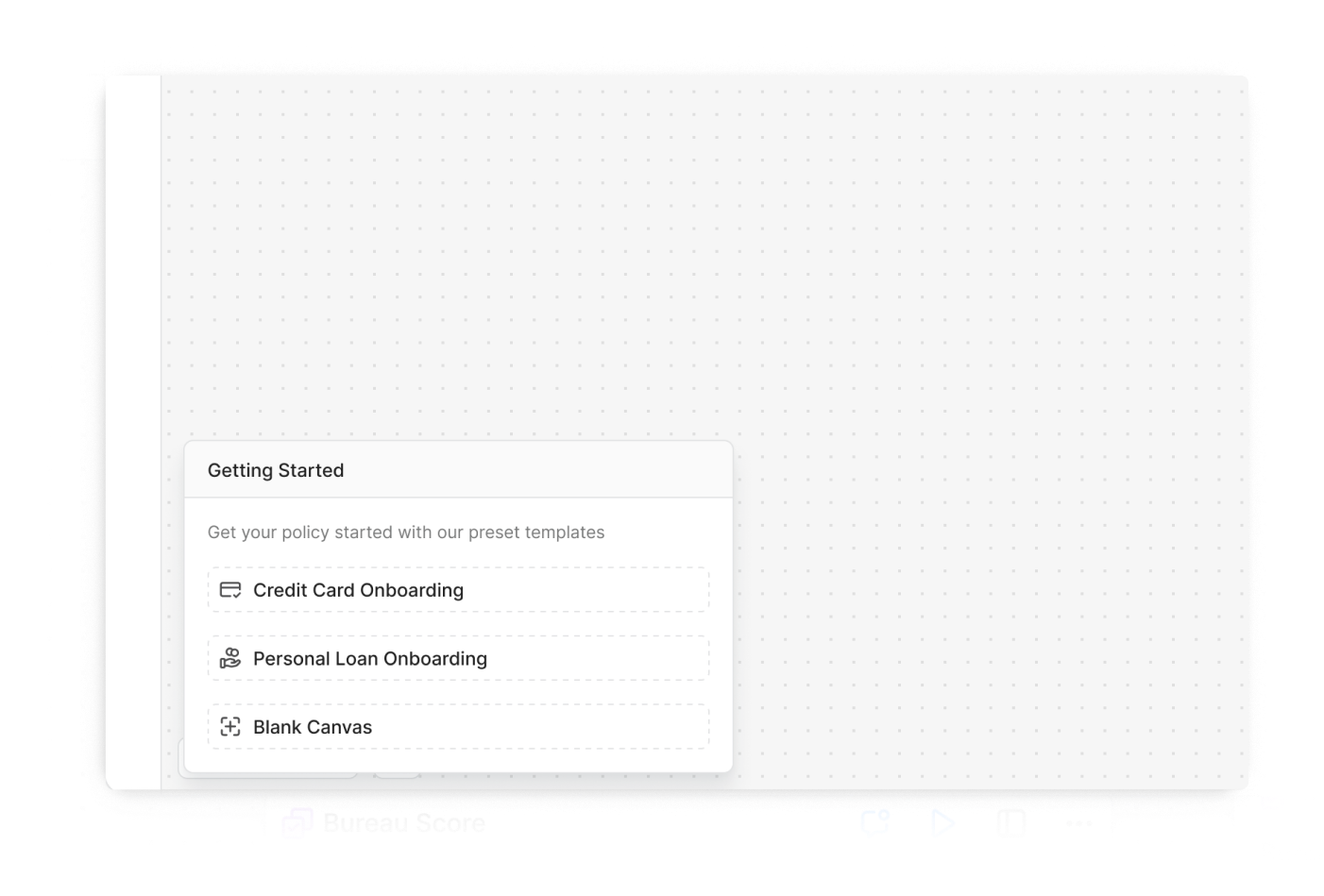
Template-Based Customization
Pre-built templates aligned with industry standards let users launch and modify workflows instantly, reducing setup time.
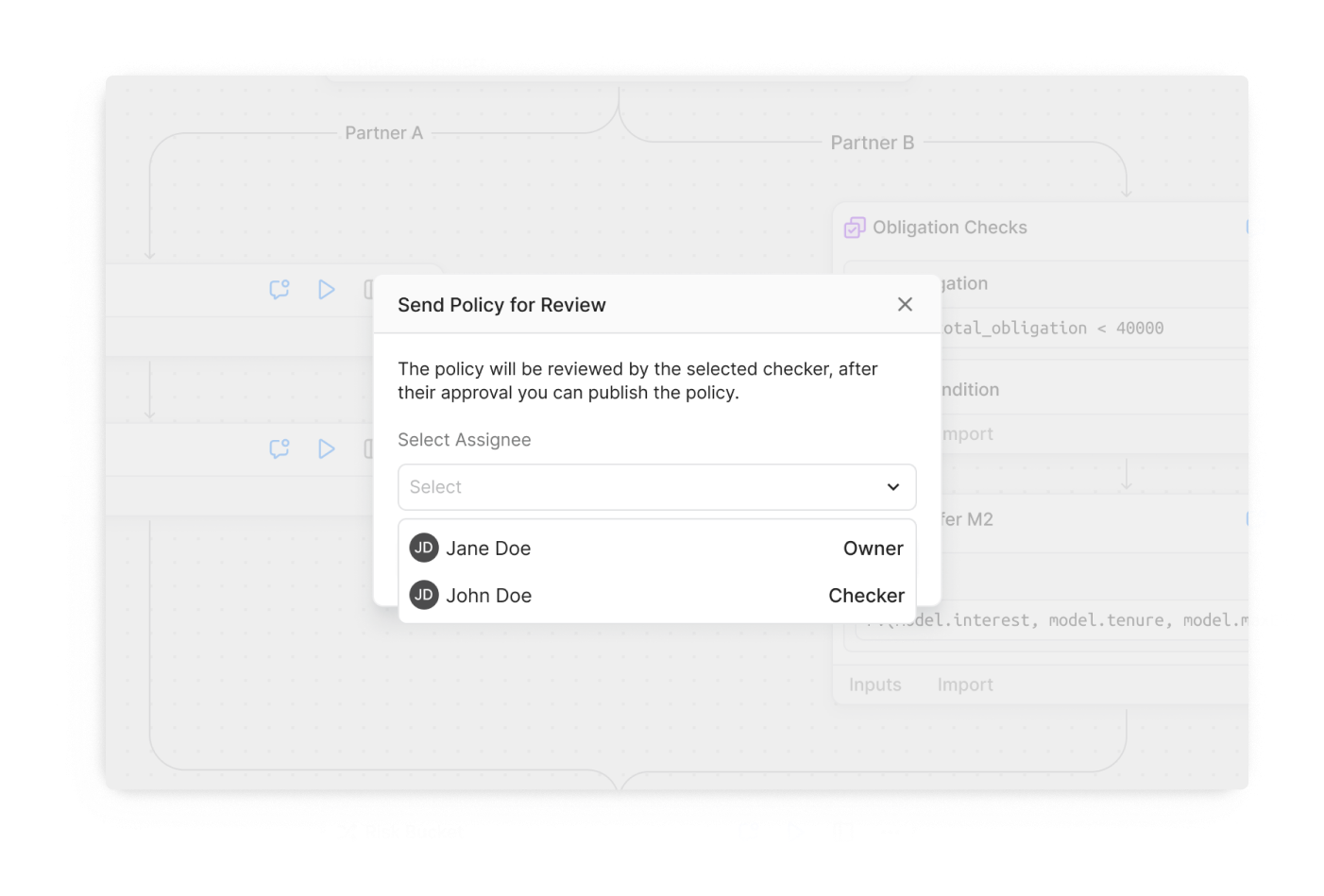
Role-Based Access Control
Makers can send policies directly to checkers for approval, ensuring a seamless review process.
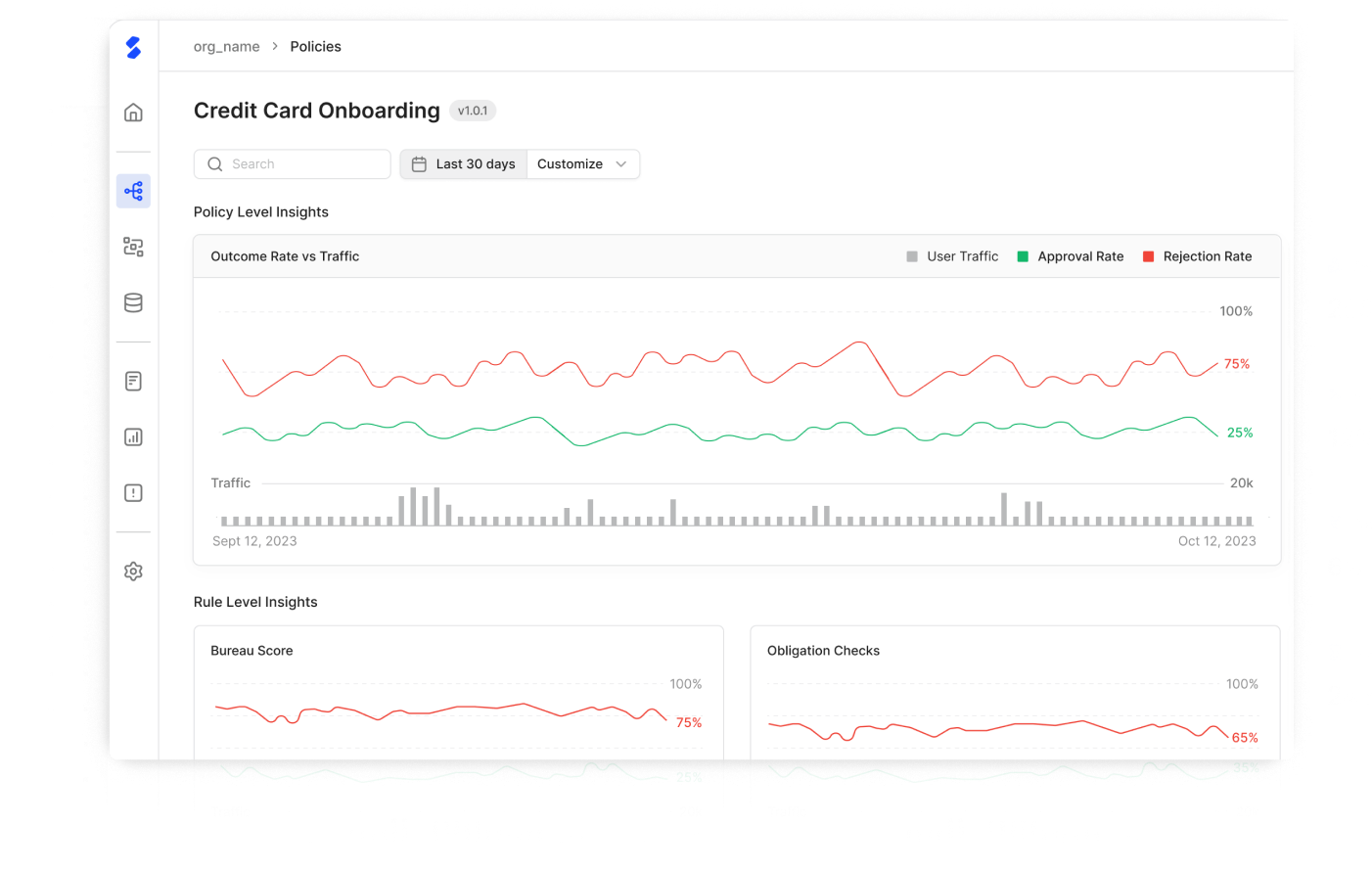
Real-Time Insights & Tracking
Users can monitor policy performance live, enabling data-driven optimizations without delays.
Customization and simplicity must coexist equally
Learnings
I learned to balance customizability with simplicity, designing for both technical and non-technical users. Integrating real-time data and ensuring scalability challenged me to create solutions that are both powerful and user-friendly.
Future Scope
Future improvements could include AI-based rule generation, allowing users to describe logic in plain English, with the AI converting it into workflow blocks. Additionally, we could introduce custom templates for policies, rules, and expressions, enabling organizations to standardize workflows across teams.
Get In Touch!

apharkare@gmail.com
or
Let’s Talk
Download Resume
Home
Work
About
© Aarya Harkare 2025. All Rights Reserved.